How to Choose a Blood Glucose Meter
Recommended picks

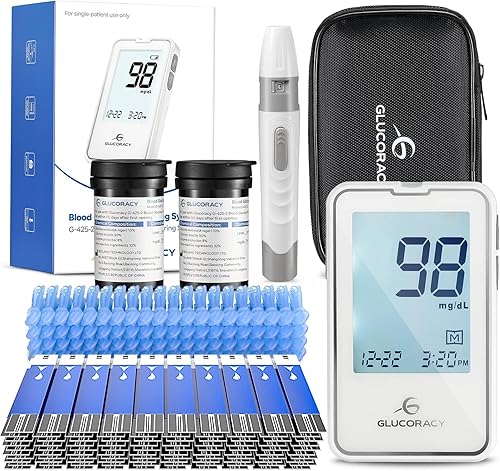

Start with the test strips, not the meter
Most meters are inexpensive, but they only work with their own brand of test strips, and you will buy strips far more often than you buy the meter. Before you choose a device, look up the price of a box of its strips and how easy they are to find at your usual pharmacy or online. A cheaper meter can end up costing more over a year if its strips are pricey or hard to get. Some kits include a starter supply of strips and lancets, which is handy for getting going right away. Confirm the strip type is still being sold so you are not left with a meter you cannot feed.
Standalone meter or app connected
A basic meter shows your reading on its own screen and stores recent results in memory, with nothing else to set up. App connected models, such as the Dario Lightning at about 50 dollars, send results to a phone app so you can keep a log and share it more easily. If you like tracking trends on your phone, the connected route can be convenient, while a standalone meter is simpler if you prefer not to deal with apps. Check what the app actually requires, such as a compatible phone or a charged battery, before you rely on it. Neither approach changes the basic blood test itself, so choose the one you will actually keep using.
Memory, logging and how it fits your day
Meters store a number of past readings so you can look back without writing everything down by hand. The Glucoracy G-425-2 at about 30 dollars, for example, advertises a 500 reading memory, which is plenty for keeping a running history. Larger memory and built in averages can make it easier to spot patterns over days and weeks. If several people will use the device, simple logging may matter less than a clear, uncluttered screen. Think about where and when you will use it, since a meter you can read quickly in poor light is one you are more likely to use consistently.
Ease of use and the testing kit
A good meter is one you can operate without fuss: clear digits, responsive buttons and a straightforward way to insert a strip. Features described by some makers, like auto coding, are meant to remove a setup step so you do not have to enter a code with each new box of strips. Check whether the kit includes a lancing device and lancets, since a comfortable lancet setup makes routine testing far less of a chore. Consider how small a blood sample the meter needs and how long it takes to show a result, as these affect daily comfort. Always follow the manufacturer's instructions for how to test correctly.
Price, ratings and what reviews tell you
Glucose meters in this category are widely affordable, often between about 18 and 50 dollars for the device itself. The iHealth BG5S100 sits around 33 dollars and carries a 4.3 star rating across roughly 4,100 reviews, while the Dario Lightning holds about 4.2 stars across more than 9,100 reviews. A high rating backed by a large number of reviews suggests many buyers found the meter dependable for everyday use. Ratings reflect customer experience, not a clinical measure of accuracy, so read them as one signal among several. Weigh the device price against strip cost so the total fits your budget over time.
Putting it together
Begin by confirming the strips you will need are affordable and in stock, then decide between a simple standalone meter and an app connected one. From there, compare memory, ease of use and the contents of the starter kit so the device suits your daily routine. Use star ratings and review counts to gauge reliability, but treat them as customer feedback rather than proof of accuracy. Whatever you pick, follow the included instructions and bring any questions about your readings to a healthcare professional, since this guide is informational only.
Common mistakes to avoid
- Choosing a meter on its price alone and ignoring the ongoing cost of test strips and lancets.
- Buying a meter whose strips are hard to find or being discontinued.
- Paying for app features you will not use, when a simple standalone meter would suit you better.
- Treating star ratings as a measure of medical accuracy rather than customer satisfaction.
- Overlooking screen readability and button feel, which affect whether you test consistently.
- Skipping the manufacturer's instructions and a chat with a healthcare professional about how to monitor.
Frequently asked questions
Are cheaper blood glucose meters worth it?
An inexpensive meter can be a fine choice if its test strips are affordable and easy to buy, since strips are the recurring cost. Look at the total cost over time, not just the upfront price. Customer ratings can help you judge whether a budget model is dependable.
Do I need a meter that connects to my phone?
Not necessarily. App connected meters like the Dario Lightning make it easy to keep a log and share results on a phone, while a standalone meter shows and stores readings on its own. Pick whichever you will actually keep using day to day.
How much memory should a glucose meter have?
Enough to cover the history you want to review without writing it down. Some models, such as the Glucoracy G-425-2, advertise a 500 reading memory, which is generous for most home use. More memory and built in averages can make it easier to see trends over time.
Can a glucose meter replace advice from my doctor?
No. A home meter gives readings for your own tracking, but it does not diagnose anything or replace professional care. Talk with a healthcare professional about how and when to monitor, and bring any questions about your results to them.